# dfm (Dylan's File Manager)
A powerful, simple and snappy terminal file manager with minimal resource usage.
 Initial Announcement: https://dylan.gr/1772192922
* Tiny (`CONFIG_SMALL`: ~90KiB, `CONFIG_TINY`: ~40KiB, `CONFIG_TINY`+ `-static`: ~150KiB)
* Fast (should only be limited by IO)
* No dynamic memory allocation (~1.5MiB static)
* Does nothing unless a key is pressed
* No dependencies outside of POSIX/libc
* Manually implemented TUI
Initial Announcement: https://dylan.gr/1772192922
* Tiny (`CONFIG_SMALL`: ~90KiB, `CONFIG_TINY`: ~40KiB, `CONFIG_TINY`+ `-static`: ~150KiB)
* Fast (should only be limited by IO)
* No dynamic memory allocation (~1.5MiB static)
* Does nothing unless a key is pressed
* No dependencies outside of POSIX/libc
* Manually implemented TUI 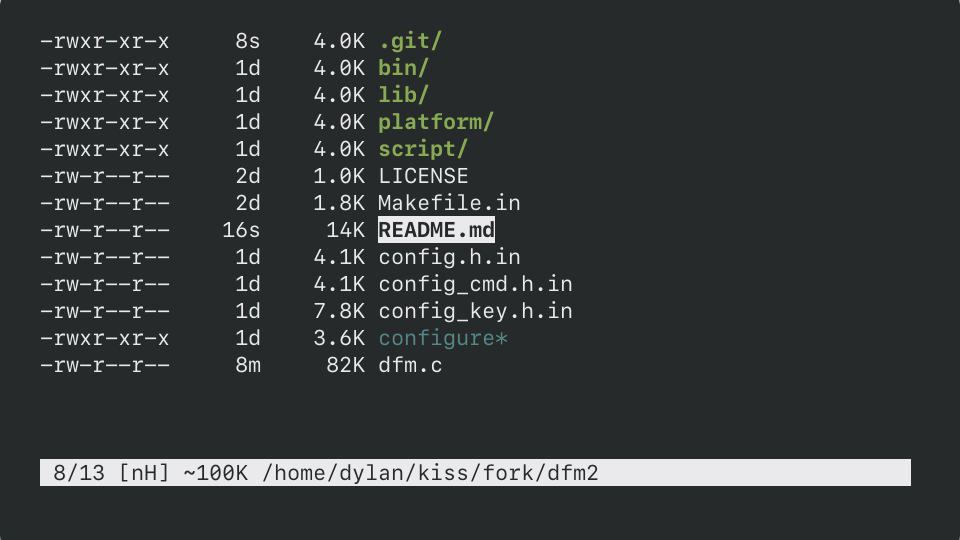 * Manually implemented interactive line editor
* Efficient low-bandwidth partial rendering
* UTF8 support (minus grapheme clusters and other unruly things)
* Inline image viewing (sixel, kitty)
* Multiple view modes (name, size, permissions, mtime, ...)
* Multiple sort modes (name, extension, size, mtime, reverse, ...)
* Ranger-style bulk rename
* Manually implemented interactive line editor
* Efficient low-bandwidth partial rendering
* UTF8 support (minus grapheme clusters and other unruly things)
* Inline image viewing (sixel, kitty)
* Multiple view modes (name, size, permissions, mtime, ...)
* Multiple sort modes (name, extension, size, mtime, reverse, ...)
* Ranger-style bulk rename 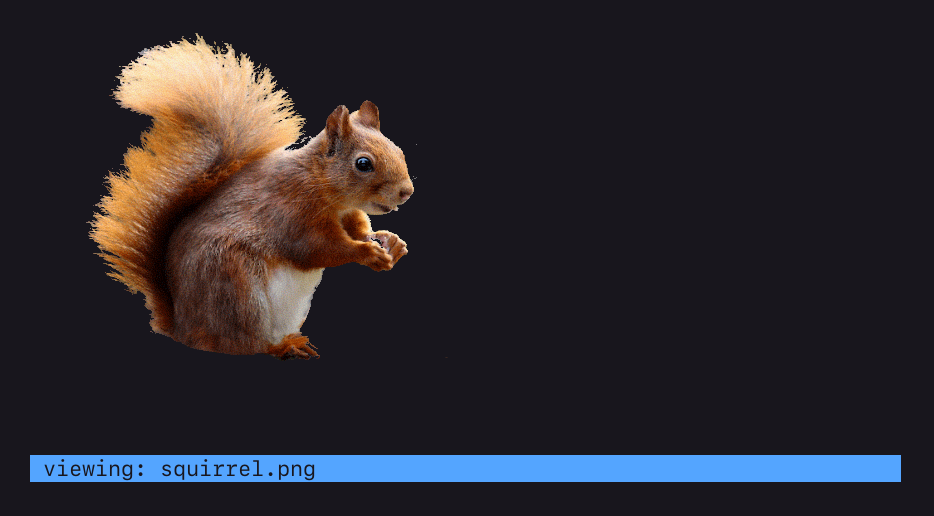 * Incremental as-you-type search
* Bookmarks
* Vim-like keybindings
* Customizable keybindings
* Command system
* Multi-entry marking
* Basic operations (open, copy, move, remove, link, etc)
* Watches filesystem for changes
* CD on exit
* And more...
## Table of Contents
* [Dependencies](#dependencies)
* [Building](#building)
* [Configuration](#configuration)
* [DPP (Dylan's Preprocessor)](#dpp-dylans-preprocessor)
* [Command-line](#command-line)
* [Environment](#environment)
* [CD On Exit](#cd-on-exit)
* [Usage](#usage)
* [Statusline](#statusline)
* [View Modes](#view-modes)
* [Sort Modes](#sort-modes)
* [Prompt](#prompt)
* [Images](#images)
* [Searching](#searching)
* [Marking](#marking)
* [Commands](#commands)
* [Privilege Escalation](#privilege-escalation)
* [Bound Commands](#bound-commands)
* [Design Considerations](#design-considerations)
* [Conclusion](#conclusion)
## Dependencies
Required:
- POSIX `cat`, `cp`, `date`, `mkdir`, `printf`, `rm`, `sh`
- POSIX `make`
- POSIX libc
- C99 compiler
Optional:
- `strip` (for `CONFIG_SMALL` and `CONFIG_TINY`)
- `clang` (for `CONFIG_TINY`)
- `chafa` (for image view using `sixel`)
- `kitty` (for image view `kitty`)
## Building
```sh
$ ./configure --prefix=/usr
$ make
$ make DESTDIR="" install
```
The configure script takes three forms of arguments.
1) Long-opts: `--prefix=/usr`, `--help`
2) Variables: `CC=/bin/cc`, `CFLAGS="-O3"`, `LDFLAGS=" "`
3) C macro definitions: `-DMACRO`, `-DMACRO=VALUE`, `-UMACRO`
There are three different build configurations.
1) Default: `-O2`
2) `CONFIG_SMALL`: `-Os` + aggressive compiler flags
3) `CONFIG_TINY`: `-Oz` + `CONFIG_SMALL` + (you must set `CC=clang`)
- To produce a static binary, pass `-static` via `CFLAGS`.
- To enable LTO, pass `-flto` via `CFLAGS`.
Everything contained within `./configure`, `Makefile.in`, `config.h.in`,
`config_cmd.h.in` and `config_key.h.in` can be configured on the command-line
via `./configure`. See `./configure --help` and also refer to these files for
more information.
Bonus example:
```sh
./configure \
--prefix=/usr \
-DCONFIG_TINY=1 \
CC=clang \
CFLAGS="$CFLAGS -flto -static" \
-DDFM_NO_COLOR \
-DDFM_COL_NAV="VT_SGR(34,7)"
```
NOTE: If you are building for an environment without support for the XTerm
alternate screen, add `-DDFM_CLEAR_EDIT` to your configure flags.
## Configuration
`dfm` is configured at compile-time via its config files.
* `./configure`: Build system, compilation and installation.
* `config.h.in`: Default settings, colors, etc.
* `config_key.h.in`: Keybindings.
* `config_cmd.h.in`: Commands.
Refer to these files for more information.
### DPP (Dylan's Preprocessor)
The `config*.in` files are processed by `dpp` (see `bin/dpp`) so POSIX shell
code can be used within them. Everything defined by `./configure` is also
accessible within these files as variables.
See https://github.com/dylanaraps/dpp for more information.
### Command-line
```
usage: dfm [options] [path]
options:
-H | +H toggle hidden files (-H off, +H on)
-p picker mode (print selected path to stdout and exit)
-o program to use when opening files (default: xdg-open)
-s change default sort
n name
N name reverse
e extension
s size
S size reverse
d date
D date reverse
-v change default view
n name only
s size
p permissions
t time
a all
--help show this help
--version show version
path:
directory to open (default: ".")
```
### Environment
A few things can be set at runtime via environment variables. If unset in the
environment, default values are derived from the `config.h.in` file.
```
- DFM_COPYER (The clipboard tool to use when copying PWD or file
contents. The tool is fed the data via )
- DFM_BOOKMARK_[0-9] (Directory bookmarks. set DFM_BOOKMARK_[0-9] and then
bind act_cd_bookmark_[0-9] to the keys of your choosing)
- DFM_OPENER (Opener script to use when opening files. This could be
xdg-open or a custom script (see the script/ directory))
- DFM_TRASH (Program to use when trashing files)
- DFM_TRASH_DIR (Path to trash directory)
- DFM_IMG_MODE (Image mode to use: 'chafa' (default), 'kitty')
- DFM_SU (Privilege escalation tool to use: 'sudo' (default))
```
### CD On Exit
There are two ways to exit `dfm`.
```
1) act_quit (default 'q')
2) act_quit_print_pwd (default 'Q')
```
Exiting with 2) will make `dfm` output the absolute path to the directory it was
in. This output can be passed to `cd` to change directory automatically on exit.
```
$ cd "$(dfm)"
$ var=$(dfm)
$ dfm > file
```
## Usage
`dfm` is a single column file-manager with VIM like keybindings. Its basic usage
is pretty straightforward and anything non-obvious can be divined by looking
at the actions each key is bound to.
### Statusline
The statusline is as follows:
```
1 1/1 [RnHE] [1+] ~0B /path/to/current/directory/
1 - Shows nest level of dfm. Only shown if > 0.
1/1 - The entry number under the cursor and the total visible entries.
[RnHE] - Indicators.
R - Shown when dfm is running as root.
n - Current sort mode: [n]ame, [N]ame reverse, [s]ize,
[S]ize reverse, [d]ate modified, [D]ate modified reverse,
[e]xtension. If the current directory is too large, in place
of sort mode, [T] is shown.
H - Shown when hidden files are enabled.
E - Shown when a command fails. This indicates that the user must
check the alternate buffer (bound to 'z' by default) to see
the error messages left by the command failure.
[1+] - Number of marked files, hidden when 0.
~0B - Approximate size of directory (shallow, excludes sub-directories).
/path/to - The current directory.
/ - The search query if the list was filtered.
```
### View Modes
There are five view modes: Normal, Size, Permissions, Date Modified and All.
The view mode can be cycled by pressing `` by default.
All is the sum of the other view modes and gives an idea of what is shown:
```
-rwxr-xr-x 16m 4.0K .git/
-rwxr-xr-x 2h 4.0K bin/
-rwxr-xr-x 4d 4.0K script/
-rwxr-xr-x 32m 4.0K lib/
-rwxr-xr-x 16h 4.0K platform/
-rw-r--r-- 16m 0B .config_macro.h
-rw-r--r-- 16m 62B .gitignore
-rw-r--r-- 4d 1.0K LICENSE.md
-rw-r--r-- 16m 1.8K Makefile
-rw-r--r-- 8h 1.8K Makefile.in
-rw-r--r-- 32s 6.6K README.txt
-rw-r--r-- 16m 4.0K config.h
-rw-r--r-- 32m 4.0K config.h.in
-rw-r--r-- 32m 6.5K config_cmd.h
-rw-r--r-- 32m 6.5K config_cmd.h.in
-rw-r--r-- 16m 6.5K config_key.h
-rw-r--r-- 32m 6.5K config_key.h.in
-rwxr-xr-x 16m 3.5K configure*
-rwxr-xr-x 16m 130K dfm*
-rw-r--r-- 32m 72K dfm.c
2/20 [nH] ~268K /home/dylan/kiss/fork/dfm
```
### Sort Modes
There are seven sort modes: `name`, `name reverse`, `size`, `size reverse`,
`date modified`, `date modified reverse`, `extension`. The sort mode can be
cycled by pressing '`' (backtick) by default.
The `name` sort performs a natural/human sort and puts directories before files.
### Prompt
The area where searches and commands are inputted is a complete interactive line
editor supporting all the usual actions (left/right scroll, insert,
bracketed clipboard paste, backspace, delete, prev/next word, etc).
The default keybindings match what is found in readline and POSIXy shells.
As of now there is no `` complete or up/down arrow history cycling.
NOTE: The prompt is implemented as a gap buffer. There are two buffers, cursor
left and cursor right with the cursor sitting inbetween both buffers. When it
comes time to commit the input it is simply joined together. Make not of this
detail as it is necessary to know it when creating your own bound commands.
### Images
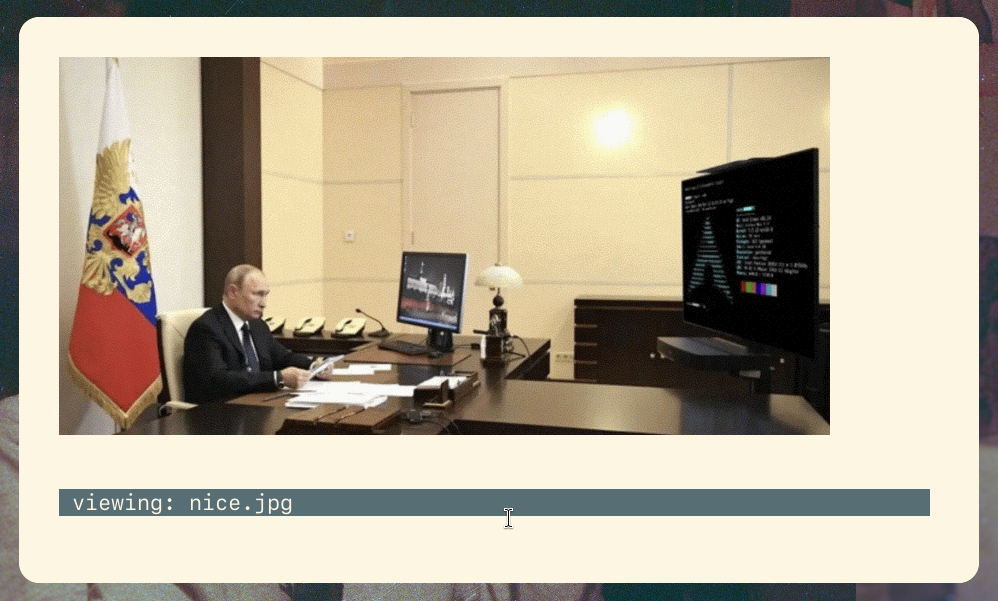
Images can be viewed inside of `dfm` by pressing `i` by default. This will
display the image and wait for a keypress before returning to the directory
listing. Two backends are supported: `sixel` (via `chafa`) and `kitty`.
The mode can be set in `config.h.in` or at runtime via an environment variable.
### Searching
There are two search modes: `startswith` (default `/`) and `substring`
(default `?`). They each perform a case-sensitive and incremental as-you-type
search on the current directory's entries.
Pressing `` confirms the search and the results become navigable. If
there is only one match, pressing `` will open the entry in a single
press.
### Marking
Files can be marked and unmarked (`` by default). There are also
shortcuts to navigate between marks, select all, clear all and to invert the
selection.
The marks can be operated on in three ways.
1) Foreach: A command is executed once per mark.
2) Bulk: A command is executed once and given the list of marks as its argv.
3) Shell: A shell command is executed (`sh -euc "" `)
- NOTE: All three can also be executed in the background.
- NOTE: If nothing is marked, the entry under the cursor is operated on.
These operations are defined as "commands" which can be typed or bound to keys.
To avoid copying data, only the basenames of marks are passed to commands and
the commands are exec'd in the directory containing them.
Example:
```sh
cp -f %m %d -> PWD=/path/to/mark_dir cp -f a b c /path/to/pwd
```
### Commands
Commands are simply strings which are minimally transformed into argvs and
executed. Modifiers control how the string will be transformed and executed.
```
:echo hello -> echo hello
:echo %f world -> foreach entry: echo world
:echo %m world -> echo ... world'.
: foreach entry: (stdin) waycopy
```
In addition to these modifiers are the following:
```
%p -> Path to PWD.
$WORD -> Expand environment variable.
& -> Run in background (must be last word)..
```
NOTE: None of the above transformations pass through or incur the cost of
running within a shell. They are merely pointer arrays passed to `exec()`.
NOTE: `%m` and `%f` cannot be combined and only the first occurrence of `%m` or
`%f` is evaluated. Also, `%m` and `%f` must appear on their own.
If these are too limiting, prepending a `!` bypasses `dfm`'s internal command mode
and sends it all to the shell.
```sh
:!echo "$@" -> sh -euc 'echo "$@"' ...
:!echo "$1" "$2" -> sh -euc 'echo "$1" "$2"' ...
```
### Privilege Escalation
Commands can be run as root by prepending `sudo` or a similar tool on the
command-line. For more complex situations, pressing `Z` by default will use
`DFM_SU` (default `sudo`) to spawn another `dfm` as `root`. The statusline will
be a different color, show the nest level and display an `R` indicator to make
the escalation obvious. Pressing `Z` again inside of this escalated mode quits
and returns to the original `dfm`.
This can be configured at runtime using the environment variable `DFM_SU` and
at compile time via the `config.h.in` file.
### Bound Commands
Commands can be bound to keys. When a command is bound it can either run
straight away or open the interactive prompt with pre-filled information.
Flags can also be set to better integrate the command into `dfm`.
Move is defined as follows:
```c
FM_CMD(cmd_move,
.prompt = CUT(":"), - The prompt.
.left = CUT("echo mv -f %m %d"), - Text left of cursor.
.enter = fm_cmd_run, - Callback.
.config = CMD_NOT_MARK_DIR | - Forbid running in mark directory.
CMD_MUT | - Command may mutate directory.
CMD_EXEC_MARK | - Skip interactive mode if marks.
CMD_CONFLICT, - Prompt on conflicts.
)
```
Chown is defined as follows:
```c
FM_CMD(cmd_chown,
.prompt = CUT(":"),
.left = CUT("chown"),
.right = CUT(" %m"), - Text right of cursor.
.enter = fm_cmd_run,
.config = CMD_MUT,
)
```
This opens the interactive prompt and puts the cursor between `chown` and `%m`
so the user can add additional information.
```sh
:chown | %a
```
In addition to `fm_cmd_run`, `fm_cmd_run_sh` can be set to bypass `dfm`'s
internal command mode to run the command in the shell.
See the `config_key.h.in` and `config_cmd.h.in` files for more information.
## Design Considerations
* I employed many tricks in order to keep memory usage low whilst still allowing
for fast operations and relatively large directory trees.
* When a directory too large for `dfm` is entered the statusline sort indicator
is replaced with `[T]` to signify truncation, sorting is disabled and the
statusline colored red. Truncation occurs when memory in the name storage or
entry list is exhausted, whichever comes first. The limits are reasonable and
unlikely to be reached outside of synthetic directory trees so this isn't
really a problem.
* File operations using coreutils commands work well but aren't as nice as
having fully integrated internal operations. I was working on it but it ended
up being a massive pain in the ass so I abandoned the idea. It's not enough to
use the POSIX functions as you will be left fighting `TOCTOU` race conditions,
control flow hell, error handling madness and other crap. A solution is to
conditionally use each OS's extension functions (ie, Linux's `copy_file()`,
`renameat2()`, `O_TMPFILE`, `AT_EMPTY_PATH`, etc) but then you end up stuck in
preprocessor `#ifdef` soup.
* UTF8 support intentionally excludes grapheme clusters, emojis and other
complicated things. Everything else should work just fine though.
* `dfm` will do partial rendering wherever possible and also tries to do as
little display IO as it can (this is what I mean by low-bandwidth in the
feature list).
* The TUI is manually implemented using VT100 escape sequences and a few
optional modern ones (bracketed paste, XTerm alt screen, synchronized
updates). Look at `lib/term.h`, `lib/term_key.h`, `lib/vt.h` and scan `dfm.c`
for `VT_.*` to see how it works.
NOTE: `dfm` works in pretty much every terminal emulator in wide use but since
it intentionally doesn't use terminfo it may not display correctly in some
environments (notably the TTY console in some BSDs). I don't think there's
anything I can do to remedy this unfortunately.
* The number of marks is bounded only when it comes to materializing them. For
1000 marks `dfm` needs the space to construct an `argv` to accommodate them.
This is not all, if a `cd` is performed, space is also needed to store the mark
entry names as the new directory will overwrite them. Marks are stored on the
end of the directory storage growing towards its middle. In other words,
materialized marks are stored in the free space not taken up by directory
entries. This creates two scenarios.
1) Inside the same directory as the marks `dfm` can mark and operate on all of
the entries without needing any extra memory as the marks are virtual.
However, if `%m` is used inside the mark directory, `dfm` must materialize
them and the number is bounded by whatever unused memory is available. This
doesn't limit operation on files as `dfm` will process the marks in chunks.
- `%f`: 900 marks -> n/a -> cmd x 900
- `%m`: 900 marks -> 300 slots -> cmd x 3
2) Outside of the directory `dfm` needs space to materialize the marks so
mark that travel are bounded.
In short:
- in mark dir + `%f` == boundless mark operations.
- in mark dir + `%m` == boundless mark operations (chunked).
- outside mark dir + `%f` == bounded mark operations.
- outside mark dir + `%m` == bounded mark operations.
## Conclusion
I had a lot of fun writing this.
Thank you for reading.
- Also check out `dpp`: https://github.com/dylanaraps/dpp
- And my blog: https://dylan.gr
* Incremental as-you-type search
* Bookmarks
* Vim-like keybindings
* Customizable keybindings
* Command system
* Multi-entry marking
* Basic operations (open, copy, move, remove, link, etc)
* Watches filesystem for changes
* CD on exit
* And more...
## Table of Contents
* [Dependencies](#dependencies)
* [Building](#building)
* [Configuration](#configuration)
* [DPP (Dylan's Preprocessor)](#dpp-dylans-preprocessor)
* [Command-line](#command-line)
* [Environment](#environment)
* [CD On Exit](#cd-on-exit)
* [Usage](#usage)
* [Statusline](#statusline)
* [View Modes](#view-modes)
* [Sort Modes](#sort-modes)
* [Prompt](#prompt)
* [Images](#images)
* [Searching](#searching)
* [Marking](#marking)
* [Commands](#commands)
* [Privilege Escalation](#privilege-escalation)
* [Bound Commands](#bound-commands)
* [Design Considerations](#design-considerations)
* [Conclusion](#conclusion)
## Dependencies
Required:
- POSIX `cat`, `cp`, `date`, `mkdir`, `printf`, `rm`, `sh`
- POSIX `make`
- POSIX libc
- C99 compiler
Optional:
- `strip` (for `CONFIG_SMALL` and `CONFIG_TINY`)
- `clang` (for `CONFIG_TINY`)
- `chafa` (for image view using `sixel`)
- `kitty` (for image view `kitty`)
## Building
```sh
$ ./configure --prefix=/usr
$ make
$ make DESTDIR="" install
```
The configure script takes three forms of arguments.
1) Long-opts: `--prefix=/usr`, `--help`
2) Variables: `CC=/bin/cc`, `CFLAGS="-O3"`, `LDFLAGS=" "`
3) C macro definitions: `-DMACRO`, `-DMACRO=VALUE`, `-UMACRO`
There are three different build configurations.
1) Default: `-O2`
2) `CONFIG_SMALL`: `-Os` + aggressive compiler flags
3) `CONFIG_TINY`: `-Oz` + `CONFIG_SMALL` + (you must set `CC=clang`)
- To produce a static binary, pass `-static` via `CFLAGS`.
- To enable LTO, pass `-flto` via `CFLAGS`.
Everything contained within `./configure`, `Makefile.in`, `config.h.in`,
`config_cmd.h.in` and `config_key.h.in` can be configured on the command-line
via `./configure`. See `./configure --help` and also refer to these files for
more information.
Bonus example:
```sh
./configure \
--prefix=/usr \
-DCONFIG_TINY=1 \
CC=clang \
CFLAGS="$CFLAGS -flto -static" \
-DDFM_NO_COLOR \
-DDFM_COL_NAV="VT_SGR(34,7)"
```
NOTE: If you are building for an environment without support for the XTerm
alternate screen, add `-DDFM_CLEAR_EDIT` to your configure flags.
## Configuration
`dfm` is configured at compile-time via its config files.
* `./configure`: Build system, compilation and installation.
* `config.h.in`: Default settings, colors, etc.
* `config_key.h.in`: Keybindings.
* `config_cmd.h.in`: Commands.
Refer to these files for more information.
### DPP (Dylan's Preprocessor)
The `config*.in` files are processed by `dpp` (see `bin/dpp`) so POSIX shell
code can be used within them. Everything defined by `./configure` is also
accessible within these files as variables.
See https://github.com/dylanaraps/dpp for more information.
### Command-line
```
usage: dfm [options] [path]
options:
-H | +H toggle hidden files (-H off, +H on)
-p picker mode (print selected path to stdout and exit)
-o program to use when opening files (default: xdg-open)
-s change default sort
n name
N name reverse
e extension
s size
S size reverse
d date
D date reverse
-v change default view
n name only
s size
p permissions
t time
a all
--help show this help
--version show version
path:
directory to open (default: ".")
```
### Environment
A few things can be set at runtime via environment variables. If unset in the
environment, default values are derived from the `config.h.in` file.
```
- DFM_COPYER (The clipboard tool to use when copying PWD or file
contents. The tool is fed the data via )
- DFM_BOOKMARK_[0-9] (Directory bookmarks. set DFM_BOOKMARK_[0-9] and then
bind act_cd_bookmark_[0-9] to the keys of your choosing)
- DFM_OPENER (Opener script to use when opening files. This could be
xdg-open or a custom script (see the script/ directory))
- DFM_TRASH (Program to use when trashing files)
- DFM_TRASH_DIR (Path to trash directory)
- DFM_IMG_MODE (Image mode to use: 'chafa' (default), 'kitty')
- DFM_SU (Privilege escalation tool to use: 'sudo' (default))
```
### CD On Exit
There are two ways to exit `dfm`.
```
1) act_quit (default 'q')
2) act_quit_print_pwd (default 'Q')
```
Exiting with 2) will make `dfm` output the absolute path to the directory it was
in. This output can be passed to `cd` to change directory automatically on exit.
```
$ cd "$(dfm)"
$ var=$(dfm)
$ dfm > file
```
## Usage
`dfm` is a single column file-manager with VIM like keybindings. Its basic usage
is pretty straightforward and anything non-obvious can be divined by looking
at the actions each key is bound to.
### Statusline
The statusline is as follows:
```
1 1/1 [RnHE] [1+] ~0B /path/to/current/directory/
1 - Shows nest level of dfm. Only shown if > 0.
1/1 - The entry number under the cursor and the total visible entries.
[RnHE] - Indicators.
R - Shown when dfm is running as root.
n - Current sort mode: [n]ame, [N]ame reverse, [s]ize,
[S]ize reverse, [d]ate modified, [D]ate modified reverse,
[e]xtension. If the current directory is too large, in place
of sort mode, [T] is shown.
H - Shown when hidden files are enabled.
E - Shown when a command fails. This indicates that the user must
check the alternate buffer (bound to 'z' by default) to see
the error messages left by the command failure.
[1+] - Number of marked files, hidden when 0.
~0B - Approximate size of directory (shallow, excludes sub-directories).
/path/to - The current directory.
/ - The search query if the list was filtered.
```
### View Modes
There are five view modes: Normal, Size, Permissions, Date Modified and All.
The view mode can be cycled by pressing `` by default.
All is the sum of the other view modes and gives an idea of what is shown:
```
-rwxr-xr-x 16m 4.0K .git/
-rwxr-xr-x 2h 4.0K bin/
-rwxr-xr-x 4d 4.0K script/
-rwxr-xr-x 32m 4.0K lib/
-rwxr-xr-x 16h 4.0K platform/
-rw-r--r-- 16m 0B .config_macro.h
-rw-r--r-- 16m 62B .gitignore
-rw-r--r-- 4d 1.0K LICENSE.md
-rw-r--r-- 16m 1.8K Makefile
-rw-r--r-- 8h 1.8K Makefile.in
-rw-r--r-- 32s 6.6K README.txt
-rw-r--r-- 16m 4.0K config.h
-rw-r--r-- 32m 4.0K config.h.in
-rw-r--r-- 32m 6.5K config_cmd.h
-rw-r--r-- 32m 6.5K config_cmd.h.in
-rw-r--r-- 16m 6.5K config_key.h
-rw-r--r-- 32m 6.5K config_key.h.in
-rwxr-xr-x 16m 3.5K configure*
-rwxr-xr-x 16m 130K dfm*
-rw-r--r-- 32m 72K dfm.c
2/20 [nH] ~268K /home/dylan/kiss/fork/dfm
```
### Sort Modes
There are seven sort modes: `name`, `name reverse`, `size`, `size reverse`,
`date modified`, `date modified reverse`, `extension`. The sort mode can be
cycled by pressing '`' (backtick) by default.
The `name` sort performs a natural/human sort and puts directories before files.
### Prompt
The area where searches and commands are inputted is a complete interactive line
editor supporting all the usual actions (left/right scroll, insert,
bracketed clipboard paste, backspace, delete, prev/next word, etc).
The default keybindings match what is found in readline and POSIXy shells.
As of now there is no `` complete or up/down arrow history cycling.
NOTE: The prompt is implemented as a gap buffer. There are two buffers, cursor
left and cursor right with the cursor sitting inbetween both buffers. When it
comes time to commit the input it is simply joined together. Make not of this
detail as it is necessary to know it when creating your own bound commands.
### Images
Images can be viewed inside of `dfm` by pressing `i` by default. This will
display the image and wait for a keypress before returning to the directory
listing. Two backends are supported: `sixel` (via `chafa`) and `kitty`.
The mode can be set in `config.h.in` or at runtime via an environment variable.

### Searching
There are two search modes: `startswith` (default `/`) and `substring`
(default `?`). They each perform a case-sensitive and incremental as-you-type
search on the current directory's entries.
Pressing `` confirms the search and the results become navigable. If
there is only one match, pressing `` will open the entry in a single
press.
### Marking
Files can be marked and unmarked (`` by default). There are also
shortcuts to navigate between marks, select all, clear all and to invert the
selection.
The marks can be operated on in three ways.
1) Foreach: A command is executed once per mark.
2) Bulk: A command is executed once and given the list of marks as its argv.
3) Shell: A shell command is executed (`sh -euc "" `)
- NOTE: All three can also be executed in the background.
- NOTE: If nothing is marked, the entry under the cursor is operated on.
These operations are defined as "commands" which can be typed or bound to keys.
To avoid copying data, only the basenames of marks are passed to commands and
the commands are exec'd in the directory containing them.
Example:
```sh
cp -f %m %d -> PWD=/path/to/mark_dir cp -f a b c /path/to/pwd
```
### Commands
Commands are simply strings which are minimally transformed into argvs and
executed. Modifiers control how the string will be transformed and executed.
```
:echo hello -> echo hello
:echo %f world -> foreach entry: echo world
:echo %m world -> echo ... world'.
: foreach entry: (stdin) waycopy
```
In addition to these modifiers are the following:
```
%p -> Path to PWD.
$WORD -> Expand environment variable.
& -> Run in background (must be last word)..
```
NOTE: None of the above transformations pass through or incur the cost of
running within a shell. They are merely pointer arrays passed to `exec()`.
NOTE: `%m` and `%f` cannot be combined and only the first occurrence of `%m` or
`%f` is evaluated. Also, `%m` and `%f` must appear on their own.
If these are too limiting, prepending a `!` bypasses `dfm`'s internal command mode
and sends it all to the shell.
```sh
:!echo "$@" -> sh -euc 'echo "$@"' ...
:!echo "$1" "$2" -> sh -euc 'echo "$1" "$2"' ...
```
### Privilege Escalation
Commands can be run as root by prepending `sudo` or a similar tool on the
command-line. For more complex situations, pressing `Z` by default will use
`DFM_SU` (default `sudo`) to spawn another `dfm` as `root`. The statusline will
be a different color, show the nest level and display an `R` indicator to make
the escalation obvious. Pressing `Z` again inside of this escalated mode quits
and returns to the original `dfm`.
This can be configured at runtime using the environment variable `DFM_SU` and
at compile time via the `config.h.in` file.
### Bound Commands
Commands can be bound to keys. When a command is bound it can either run
straight away or open the interactive prompt with pre-filled information.
Flags can also be set to better integrate the command into `dfm`.
Move is defined as follows:
```c
FM_CMD(cmd_move,
.prompt = CUT(":"), - The prompt.
.left = CUT("echo mv -f %m %d"), - Text left of cursor.
.enter = fm_cmd_run, - Callback.
.config = CMD_NOT_MARK_DIR | - Forbid running in mark directory.
CMD_MUT | - Command may mutate directory.
CMD_EXEC_MARK | - Skip interactive mode if marks.
CMD_CONFLICT, - Prompt on conflicts.
)
```
Chown is defined as follows:
```c
FM_CMD(cmd_chown,
.prompt = CUT(":"),
.left = CUT("chown"),
.right = CUT(" %m"), - Text right of cursor.
.enter = fm_cmd_run,
.config = CMD_MUT,
)
```
This opens the interactive prompt and puts the cursor between `chown` and `%m`
so the user can add additional information.
```sh
:chown | %a
```
In addition to `fm_cmd_run`, `fm_cmd_run_sh` can be set to bypass `dfm`'s
internal command mode to run the command in the shell.
See the `config_key.h.in` and `config_cmd.h.in` files for more information.
## Design Considerations
* I employed many tricks in order to keep memory usage low whilst still allowing
for fast operations and relatively large directory trees.
* When a directory too large for `dfm` is entered the statusline sort indicator
is replaced with `[T]` to signify truncation, sorting is disabled and the
statusline colored red. Truncation occurs when memory in the name storage or
entry list is exhausted, whichever comes first. The limits are reasonable and
unlikely to be reached outside of synthetic directory trees so this isn't
really a problem.
* File operations using coreutils commands work well but aren't as nice as
having fully integrated internal operations. I was working on it but it ended
up being a massive pain in the ass so I abandoned the idea. It's not enough to
use the POSIX functions as you will be left fighting `TOCTOU` race conditions,
control flow hell, error handling madness and other crap. A solution is to
conditionally use each OS's extension functions (ie, Linux's `copy_file()`,
`renameat2()`, `O_TMPFILE`, `AT_EMPTY_PATH`, etc) but then you end up stuck in
preprocessor `#ifdef` soup.
* UTF8 support intentionally excludes grapheme clusters, emojis and other
complicated things. Everything else should work just fine though.
* `dfm` will do partial rendering wherever possible and also tries to do as
little display IO as it can (this is what I mean by low-bandwidth in the
feature list).
* The TUI is manually implemented using VT100 escape sequences and a few
optional modern ones (bracketed paste, XTerm alt screen, synchronized
updates). Look at `lib/term.h`, `lib/term_key.h`, `lib/vt.h` and scan `dfm.c`
for `VT_.*` to see how it works.
NOTE: `dfm` works in pretty much every terminal emulator in wide use but since
it intentionally doesn't use terminfo it may not display correctly in some
environments (notably the TTY console in some BSDs). I don't think there's
anything I can do to remedy this unfortunately.
* The number of marks is bounded only when it comes to materializing them. For
1000 marks `dfm` needs the space to construct an `argv` to accommodate them.
This is not all, if a `cd` is performed, space is also needed to store the mark
entry names as the new directory will overwrite them. Marks are stored on the
end of the directory storage growing towards its middle. In other words,
materialized marks are stored in the free space not taken up by directory
entries. This creates two scenarios.
1) Inside the same directory as the marks `dfm` can mark and operate on all of
the entries without needing any extra memory as the marks are virtual.
However, if `%m` is used inside the mark directory, `dfm` must materialize
them and the number is bounded by whatever unused memory is available. This
doesn't limit operation on files as `dfm` will process the marks in chunks.
- `%f`: 900 marks -> n/a -> cmd x 900
- `%m`: 900 marks -> 300 slots -> cmd x 3
2) Outside of the directory `dfm` needs space to materialize the marks so
mark that travel are bounded.
In short:
- in mark dir + `%f` == boundless mark operations.
- in mark dir + `%m` == boundless mark operations (chunked).
- outside mark dir + `%f` == bounded mark operations.
- outside mark dir + `%m` == bounded mark operations.
## Conclusion
I had a lot of fun writing this.
Thank you for reading.
- Also check out `dpp`: https://github.com/dylanaraps/dpp
- And my blog: https://dylan.gr